
How to use a bitcoin mixer, step by step
發布於: 2026年9月13日
本文尚未翻譯成您的語言,您正在閱讀 English 原文。
This guide shows how to use a bitcoin mixer from the first click to the second payout, walked through on notrace.exchange, which opened to the public on 12 September 2026. A few things here differ from the usual "send coins, get coins back": every payout is split between two addresses you name, each part leaves after its own delay, a coin can be mixed into the same coin, and before paying you can download a letter signed with our PGP key. There is no registration, no email and no document check.
How a bitcoin mixer can help
Bitcoin keeps every transfer in public, and chain analysis reads more into it than most people expect. When one transaction spends several inputs, they are treated as belonging to a single owner — that one assumption is what address clustering is built on. Change gives the rest away: when an output returns to the sender, telling it apart from the payment is often trivial.
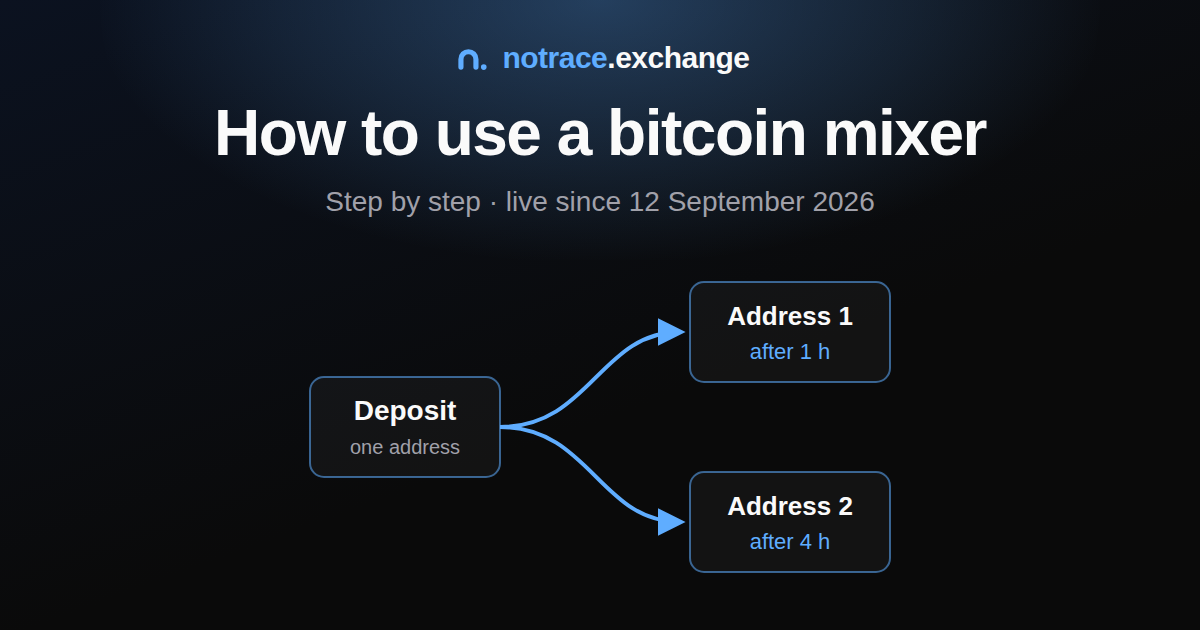
A mixer stands between a deposit and its payout so the two no longer line up. You send coins to a deposit address issued for your order alone, and what later reaches your wallets are different transactions from a different sender. On notrace.exchange that payout is always two transfers to two addresses, released at moments you pick, so no single withdrawal mirrors your deposit.
What you need before you start
- The coin you want to mix, on the network you will send it from. Bitcoin means native Bitcoin; USDT on Ethereum and USDT on Tron are different assets, not one asset with a setting.
- Two receiving addresses of your own, on the network of the coin you want to receive. They must be different: an order naming one address twice is refused.
- Personal wallet addresses rather than an exchange deposit address. Our transfers carry no memo or destination tag, and an address that needs one may never credit the funds — with two transfers that risk counts twice.
- A place to save a link. The order page is the only way back to your order, since no email is asked for.
Step 1: calculate
Open the mixer and choose what you send and what you want to receive. The same asset on both sides is allowed — BTC in, BTC out. Choose a different asset on the right and the payout arrives in it, at the rate you see before you pay.
The minimum for that coin is shown under the amount field. There is no fixed maximum: the ceiling is however much liquidity that direction has at the moment, and if your amount is above it, the calculation says so and names what can be mixed right now.
The figure you get already has every fee taken out, including the network costs of both outgoing transfers. Our service fee on 13 September 2026 was 0.5%, and it is the only thing we add; the current number is always in the FAQ.
Step 2: two addresses and two delays
Enter the two receiving addresses and choose a delay for each. On 13 September 2026 the choice ran from no delay to 6 hours, in one-hour steps. Then decide how the payout is divided:
- Automatic. The split is drawn for you once, when the order is created, so the division shown before you pay is the one you get.
- I set the amount. You name a minimum for the first address and the rest goes to the second. The first address receives at least that figure, sometimes a fraction more.
Leaving both delays at zero is allowed, but the two transfers then leave close together — which is exactly the pattern the split exists to avoid. Two different delays cost nothing extra.
Step 3: check the letter of guarantee
Once the order is created, the page shows a deposit address and offers a letter of guarantee: plain text signed with our PGP key, stating what this order promised. It names what you send, the least you receive in total, both addresses, both delays, how the payout divides between them, and the payment deadline. Per-transfer amounts carry a tilde until the transfers arrive; the total is the firm promise.
Checking it does not require trusting our website:
- Save the public key from the PGP page to a file.
- Import it into your own GnuPG (gnupg.org).
- Compare the fingerprint gpg prints with ours:
3B12 2BBB DC0B C8CB 90D8 A7FA 5D3C D31A 3A22 A5D6. If they differ, the key you have is not ours. - Run
gpg --verifyon the letter downloaded from your order page.
A good signature means the text is exactly what we signed. A warning that the key is not certified with a trusted signature is expected — it only means you have not signed our key yourself. Keep the file: it proves the promise to anyone, later, without asking us.
Step 4: send the deposit and wait
Send exactly the amount shown, to the address shown, on the network shown — and on no other network. The deposit address belongs to this order alone; do not reuse it.
From here the order page does the work, and you can close the tab and return by its link. Two waits add up. First the deposit is confirmed by its own network: on Bitcoin that is the slow part, on Solana it takes moments. Then each transfer waits out its own delay, counted from the moment your deposit settles rather than from when you created the order, with a small random spread added so nothing leaves at an exact round time.
Both transfers are listed as Scheduled, Sending or Sent, with the time left for each. As each one goes out, the page links its transaction, so the second address can be checked as easily as the first. Amounts marked ≈ are estimates; the exact figure is in the transaction itself.
Are bitcoin mixers traceable?
A mixer exists to break the link between a deposit and its payout. Every order here is settled on a private settlement layer, so the link between your deposit and your payout is not written to the public blockchain. What chain analysis looks for next is a withdrawal that mirrors the deposit: the same amount, to one address, minutes later. The payout here is built not to look like that — it leaves as two transfers, to two different addresses, each after a delay you choose.
Take the payout in another coin, and its asset and amount differ from the deposit as well.
One more fact before you pay. While a delay is running, the funds for that transfer are held by us — from the moment your deposit settles until the last transfer has left. Section 8 of the terms says so in plain words.
What we keep about you
The order itself: its addresses, amounts and times. An order created on the clearnet site also records the connecting IP address, which is erased after 30 days (the setting on 13 September 2026). An order created over Tor carries no IP at all.
Is there a bitcoin mixer app?
Not from us, and none is needed. The mixer is a website with a Tor mirror that works with JavaScript switched off, so it opens in Tor Browser on the Safest level:
notracemxdnjycucwtrywh5n3eu3immfijvsoparxbvas5msb5557vqd.onion
The same address is printed in the footer of this site and in every signed letter, which lets you confirm that a mirror found elsewhere is really ours.
Mistakes that cost money
- The wrong network. Coins sent on a network other than the one on the order page do not reach the mixer. Recovery is manual, slow and not always possible.
- Sending less than the order amount. Payments to the same deposit address add up, so top up the difference while the countdown runs and the mix starts on its own. If the window closes first, the deposit comes back to us, and support returns it on request with your order ID.
- Sending more. Exactly the order amount goes into the mix; the excess takes no part in it and is returned through support on request.
- An address that needs a memo. Both payouts go out without one, so an exchange deposit address may never credit them.
- Losing the order link. It is the only way back to the order and to its letter.
Where to start
Each coin has its own page, which opens the form in that coin with its live minimum and the network questions that matter for it: the bitcoin mixer, Ethereum, Solana and USDT on Ethereum. If this guide and the FAQ ever disagree, the FAQ is the current one.
Still comparing services? The checks in how to choose the best bitcoin mixer work on any of them, this one included.